3.- Purchase or order phase
3.1 Order reception
 Once the order is received, we must verify that the equipment received corresponds to what was requested and that it is also silk-screened with the institutional logo
IMPORTANT: All equipment in Lot 2, except for Smartphones, smartwatches and barcode readers, will be silk-screened on the external part using indelible means. If a piece of equipment is delivered without silk-screening, it will be returned to the awarded company using the “Claim order” button so they can proceed with the silk-screening; the company will bear all collection and delivery costs.
In this practical case, we requested a desktop computer; therefore, we should check that the equipment is the requested brand and model (i5, 16GB RAM, 512GB SSD, Keyboard, Optical Mouse, and Silk-screened). Additionally, as it is a desktop computer, we must check that it includes a Keyboard and Optical Mouse.
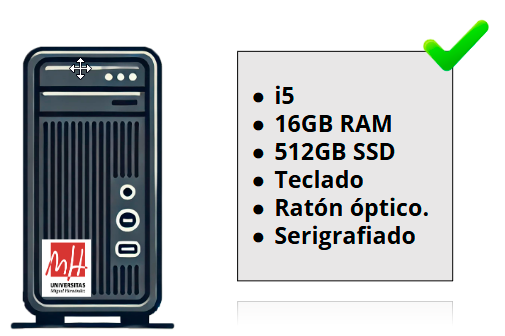
What should I do if I received an item without silk-screening?
First, check if the item belongs to any of the following categories:
desktop computers, monitors, laptops, tablets, e-ink tablets, Mac equipment, printers, 3D printers or scanners.
If the equipment does not feature the mandatory silk-screening, you must contact the supplying company to request its collection and subsequent silk-screening.
This management must be carried out through the Ordering application, using the “Claim Order” button within the corresponding order page. In the claim observations field, include the following text (adjusted as necessary):
“The item corresponding to this order has been received without the mandatory silk-screening stipulated in the Technical Specifications Document (PPT). We hereby request its collection to carry out the silk-screening.”
It is important to note that the Budgetary and Assets Management Service requires that all inventoriable items mentioned above be delivered correctly silk-screened, as established in the specifications. This condition is essential for processing the invoice payment.
3.2 Reject / Claim order / Confirm delivery
 Companies have a delivery period of 15 days. Once this period has passed, we can manage the order directly from the application, either by claiming it, canceling it if necessary, or confirming its delivery.
3.2.1.- Reject order
It is important to remember that cancellation should only be carried out in duly justified cases.
3.2.2.- Claim order
The “Claim order” button can be used to contact the company, for example to inform about a problem with the order reception or to request the invoice.
3.2.3 Confirm delivery
If the delivery has been carried out correctly, we can close the order in the application using the “Confirm delivery” button, recording the receipt date of the item. This date will be used as the reference for the start of the warranty period.