Centralized Printing Service
 Description:
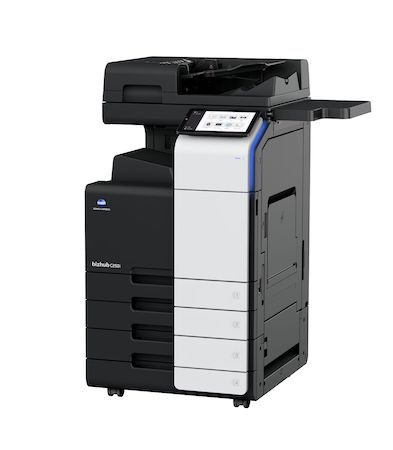
The Centralized Printing Service is a comprehensive print management solution, including printing, copying, faxing, scanning, and stapling of documents through multi-function devices. Combined with a management tool, it allows us to offer a fully managed service across different campuses.
Service Objectives
To provide users with a printing service featuring homogeneous resources that enable reliable and secure printing by collecting documents at any printer in the service, regardless of the campus or building where the device is located. This service also eliminates the management of printer purchases and/or printing contracts, consumables, and paper. It provides a fixed printing cost. It maximizes the efficiency of incident management. It reduces the number of devices, allowing for energy reduction and adapting them to user needs.
Requirements and conditions:
Belonging to one of the services or departments affiliated with the Centralized Printing Service, as either Administrative and Support Staff (PAS) or Teaching and Research Staff (PDI) of the UMH.
Service Presentation:
- Centralized Printing Service Presentation (PDF)
 : This presentation provides more information on how the Service works, equipment models, and printing costs.
Printing permissions:
- All PAS/PDI staff associated with an Organizational Unit (UOR) have permissions to charge printing costs to it; these are granted automatically.
- How to manage centralized printing service permissions : For cases where we want to grant printing permissions to staff who are not PAS/PDI of your organizational unit (UOR) so they can use the service and charge costs to that unit.
Below are the configuration and installation manuals (to access them, you will be asked for your UMH username and password).
Configuration:
- Installing drivers and Papercut application : only necessary for devices not in the domain and for PDI equipment.
- Printer configuration in Windows : to configure the different printers of the corporate printing service in Windows.
- Software installation and printer configuration in MAC OS : to configure the different printers of the corporate printing service in MAC OS.
- Software installation and printer configuration in Linux : to configure the different printers of the corporate printing service in Linux.
- Deleting old printers : in case you want to remove printers you no longer use or that are unavailable from your computer’s printer list.
Help and Manuals:
- Logging into the printer
- Releasing Secure Print jobs
- Advanced Scanner
- Scanner
- Copy
- Printing via QR Code
- Using the stapling function
- More information
Requesting and/or accessing the service:
Any request or incident regarding the Centralized Printing Service must be communicated to the IT Infrastructure Service through the User Support Center (CAU) . In case of technical problems that prevent access to the UMH website, incidents should be reported by calling 8582. This extension has a voicemail where you can leave a message if necessary.